Important Notice
This guide is for educational purposes only. Always respect privacy laws and email regulations when tracking IP addresses through email.
Email Tracking Flow Diagram
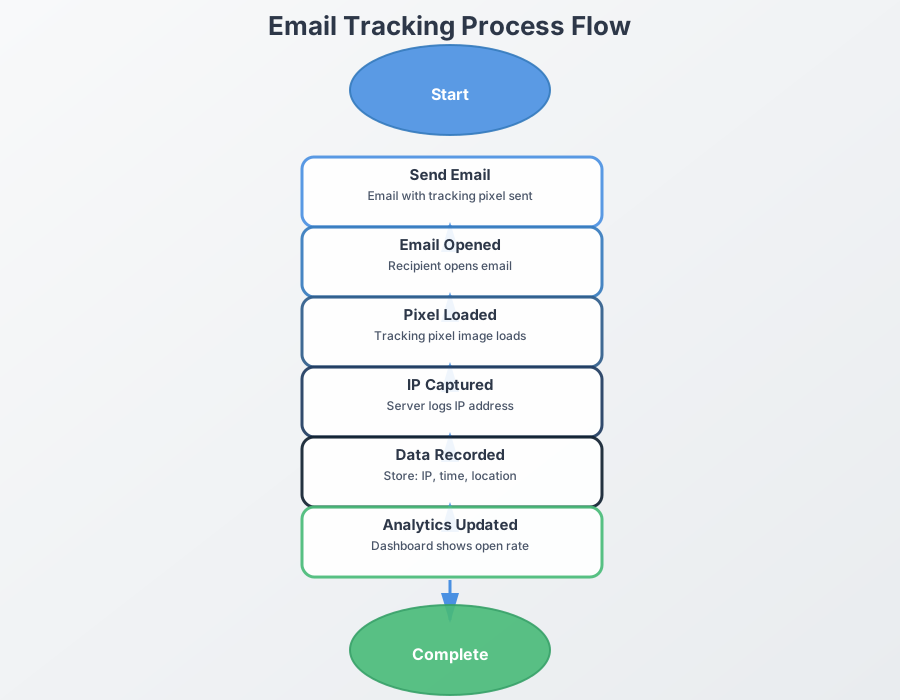
Interactive Flow Diagram
What Email Workflows Can Record
Email does not automatically expose a recipient's IP address in all cases. Modern mail clients proxy images, block remote content, or limit what senders can learn from opens. Most measurable data comes from one of three places: remote image requests, tracked link clicks, or events reported by an email service provider.
- Remote images may log a request if the client chooses to load them
- Link clicks are recorded when a recipient opens a destination you control
- ESP reports may summarize opens, clicks, and broad geolocation depending on the provider
Remote Image Requests
Email Images and Open Events
Remote images are sometimes used to estimate email opens, but their accuracy varies. Some clients proxy or cache those requests, which means the sender may see the provider's infrastructure rather than the recipient's direct IP address.
- Image requests may be blocked entirely
- Apple Mail Privacy Protection and similar features reduce direct visibility
- Open counts should be treated as estimates, not exact proof of human viewing
Link Click Logging
Destination-Side Analytics
Email links are usually more reliable than open tracking because the recipient actively chooses to open the destination. The actual IP logging happens on the page or redirect service that receives the click, not inside the email itself.
- Click logs can include time, referral context, IP address, and user agent
- This approach is easier to disclose in a campaign or support workflow
- The destination should still publish an accurate privacy notice where required
Email Service Provider Reporting
Provider-Level Reports
Many ESPs provide aggregate reporting for opens, clicks, location, and device types. The exact visibility varies widely, and not every provider exposes raw IP data directly to the sender.
- Some providers expose only summarized location and event reports
- Some enterprise plans include webhook or event-level detail
- Data availability often depends on privacy settings, client behavior, and provider policy
Setup: Enable in campaign preferences
IP Data: Detailed subscriber activity reports
Method 4: Custom Email Server Setup
Custom Server Method
Set up your own email server with IP tracking capabilities for maximum control.
Implementation Steps
Set Up Email Server
Configure a mail server (Postfix, Sendmail, etc. ) with custom tracking capabilities.
Implement Tracking Script
Create a PHP or Python script to handle tracking pixel requests and log IP addresses.
           <?php


           // tracking_pixel.php


           $ip = $_SERVER['REMOTE_ADDR'];


           $user_agent = $_SERVER['HTTP_USER_AGENT'];


           $timestamp = date('Y-m-d H:i:s');


           // Log to database


           $pdo = new PDO('mysql:host=localhost;dbname=tracking', $user, $pass);


           $stmt = $pdo->prepare("INSERT INTO email_tracking (ip, user_agent, timestamp) VALUES (?, ?, ?)");


           $stmt->execute([$ip, $user_agent, $timestamp]);


           // Return 1x1 pixel


           header('Content-Type: image/gif');


           echo base64_decode('R0lGODlhAQABAIAAAAAAAP///yH5BAEAAAAALAAAAAABAAEAAAIBRAA7');


           ?>
Configure Email Templates
Update your email templates to include the tracking pixel and links.
Method 5: Advanced Email Tracking
Advanced Techniques
Use advanced methods for more detailed IP tracking and analysis.
Technique 1: Multiple Tracking Points
Header Tracking
Add tracking pixels in email headers for additional data collection.
Footer Tracking
Include tracking elements in email footers for comprehensive coverage.
Technique 2: Behavioral Tracking
Time-based Tracking
Track when emails are opened and how long they're viewed.
Device Tracking
Collect device information along with IP addresses for better profiling.
Email Client Compatibility
Different email clients handle tracking differently:
High Compatibility
- Gmail (Web): Excellent tracking support
- Outlook (Web): Good tracking support
- Yahoo Mail: Good tracking support
- Apple Mail: Good tracking support
Best Practices for Email IP Tracking
Common Challenges and Solutions
Tools for Email IP Tracking
- WhatsTheirIP: Best overall tool with email optimization
- Mailchimp: Built-in tracking with detailed analytics
- Constant Contact: Comprehensive email tracking
- SendGrid: Advanced tracking with API access
- Campaign Monitor: Professional email tracking
Related Articles
Continue your IP tracking journey with these detailed guides:
- How to Get Someone's IP Address from a Link - Learn link-based IP tracking methods
- How to Find Someone's IP Address on Social Media - Master social media IP tracking
- Email Tracking Pixel Technology Guide - Deep dive into email tracking pixels
- Email Tracking Best Practices - Optimize your email tracking strategy
- IP Tracking GDPR Compliance - Ensure legal compliance in email tracking
Conclusion
Email IP tracking is a powerful method for gathering IP addresses and location data. By using tracking pixels. links. and advanced techniques. you can effectively track email opens and cl...
Pro Tip
Combine multiple tracking methods for the best results. Use both pixels and links to maximize your tracking coverage.
Methods Covered
- Tracking Pixels
- Tracking Links
- ESP Integration
- Custom Server
- Advanced Techniques
Recommended Tools
- WhatsTheirIP
- Mailchimp
- Constant Contact
- SendGrid
- Campaign Monitor
Important
Always comply with email marketing laws and privacy regulations when tracking IP addresses through email.